
Square Chargeback Policy (2026): Fees, Chargeback Protection


Square chargebacks come with no separate fee. When a customer disputes a Square transaction, Square covers the cost of the dispute process itself. According to Square's own pricing page, the merchant pays only the standard 2.6% + 15¢ rate that applies to every sale.
When I worked chargeback support, merchants would budget for a Square dispute fee that Square never charges, and then miss the costs that hit them anyway. Here's what Square actually charges, and how to answer a dispute inside the 7-day window.
Key takeaways
- Square charges no separate fee to handle a chargeback dispute.
- Budget for the 2.6% + 15¢ processing rate, which applies to every transaction.
- Respond within 7 days, since the bank takes up to 90.
- Square dropped its Chargeback Protection program in April 2019.
- Fix your statement descriptor first, because unrecognized charges drive disputes.
Want disputes stopped before the bank gets involved? Our chargeback alerts flag a Stripe or Shopify transaction while you can still refund it.
How does Square handle chargebacks?
A Square chargeback is a customer asking their own bank to reverse a card payment. The bank takes the money back out of your Square account while it looks into the claim.
What makes a chargeback different from every other payment problem is that the customer takes it straight to their bank. The claim goes from the cardholder to their issuing bank, then through the card network to Square. Square hands it to you and sends your evidence back up the same chain.
The bank decides who wins, which is why nobody at Square can undo a chargeback for you.
You control a refund, and a bank controls a chargeback. You can refund a customer in seconds from your Square Dashboard. A chargeback is something a bank does to you, and it stays done until you fight it and win.
Does Square have chargeback protection?
Square stopped offering chargeback protection in the United States on April 19, 2019. What you get today is help answering the dispute:
- A Disputes Dashboard that tracks every open case.
- A place to upload your evidence before the deadline.
- A Square team that argues your case with the bank.
A protection program pays you back when you lose, and response tools only improve your odds of winning. That gap is the whole difference between the two.
Square's own docs are direct about who makes the call. Once the bank rules, that's the end of it, and Square stops arguing on your behalf.
Square still markets a page titled "Chargeback Protection" in some regions, and that title is where a lot of the confusion starts. Read it closely and it describes the same dispute-management help covered above. Reimbursement for a lost dispute never appears.
Buyer protection is the other half of this question, and Square doesn't run one of those either.
Your customer's right to dispute a charge comes from the card network and their issuing bank, which is why a Square seller can't turn it off. The network looks after the cardholder, and Square's tools help you answer.
There's one narrow exception.
Square pays for fraud disputes on Cash App Pay transactions in full, so you owe nothing on those. Every other payment type leaves you on the hook for the disputed amount.
What is the Square chargeback process?
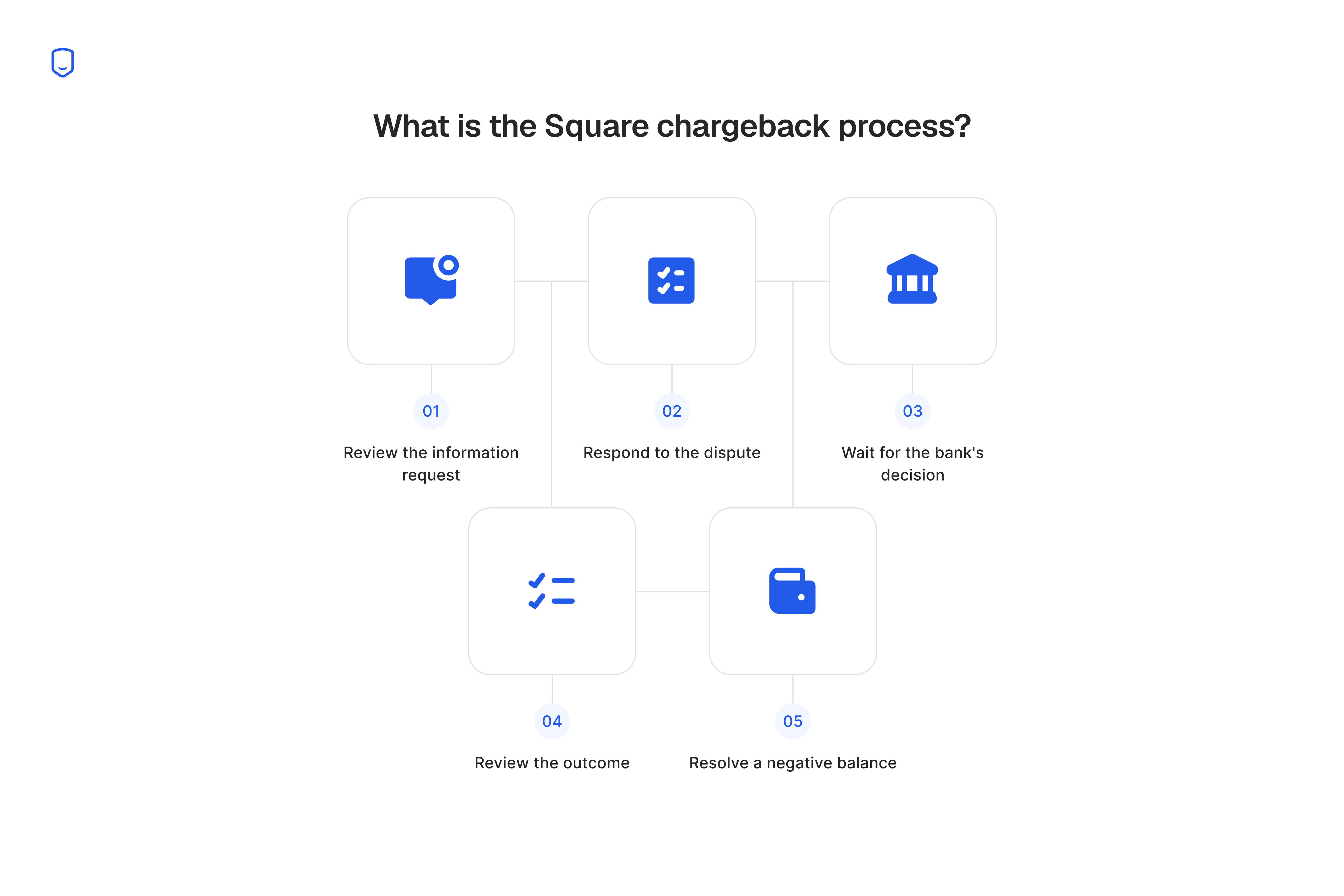
Square's dispute process starts when Square emails you a dispute notice, and ends when the issuing bank rules and Square passes the decision back to you. Square names five fixed steps in its own dispute walkthrough.
A different party owns each step, and the card network sets the timing, so you can't speed the process up or skip ahead. The only place you have any say is step two:
- Review the information request. Square notifies you by email and in the Dashboard.
- Respond to the dispute. Refund the customer or submit evidence challenging it.
- Wait for the bank's decision. The issuing bank reviews and rules.
- Review the outcome. Square passes the final decision back to you.
- Resolve a negative balance. This applies if your balance couldn't cover the amount.
Miss step two and the rest happens without you.
Step five is the one merchants don't see coming. If the disputed amount is more than your current Square balance, Square can't hold the funds, so your balance goes negative. It stays there until you cover it or the bank rules in your favor. A large dispute against a thin balance becomes a cash-flow problem the same week.
Square chargeback time limits
You get 7 days to respond to a Square dispute notice, and the issuing bank can take up to 90 days to decide.
Square sets the first deadline and the bank sets the second, which is why they're so far apart.
Square gives you 7 days to pull your paperwork together. The bank then takes as long as it wants inside its own 90-day review, and nobody at Square can shorten that. A refund you issue instead of fighting takes another 2 to 7 business days to reach the customer.
Here's the full timeline:
Hit the 7-day deadline, then wait. You can send complete evidence on day two and still lose on day 85. The bank weighs your paperwork against the cardholder's claim and makes up its own mind.
Square chargeback fees: what Square actually charges
Square charges no fee to handle a chargeback. Square's support documentation says there are no fees for dispute management services on chargebacks.
The number merchants mistake for a chargeback fee is Square's ordinary rate of 2.6% + 15¢ on an in-person tap, dip, or swipe. That rate is the same before and after a dispute.
According to Square, older guides still quote 2.6% + 10¢, which is the stale version of the same rate.
A Square dispute costs you three things:
You still lose money on a dispute you lose. You're out the full transaction amount, plus whatever you already shipped or did the work for, and the processing rate stays gone too.
Square charges nothing here where Shopify charges $15 per dispute. Our Shopify chargeback fee guide has that comparison in full.
Stripe charges you twice, once when the dispute lands and again if you contest it. Our guide to Stripe dispute fees covers that counter-fee.
How do I respond to a Square chargeback?
Respond inside the 7-day window by either refunding the customer or submitting evidence that contests the dispute. You do both in the Disputes section of your Square Dashboard.
Square sends whatever you upload to the issuing bank and argues the dispute with them. Send strong documents rather than lots of them.
The bank checks one thing.
It asks whether your evidence answers the exact reason the cardholder gave. What counts as strong evidence depends on what you sold:
- Physical goods: tracking with delivery confirmation to the cardholder's address.
- In-person sales: the signed receipt and the EMV chip transaction record.
- Services: a signed contract, appointment records, or proof of completion.
- Every sale: the digital receipt and prior messages with the customer.
Say you sell coffee equipment in a shop and a customer disputes a $400 grinder as unauthorized. The chip record showing the card was inserted, plus the signed receipt, answers that exact claim. Evidence that speaks to a different question, like a photo of the grinder, gets ignored.
Evidence you send after day seven might never get read. Late counts as no response at all, and a dispute nobody answers goes to the customer.
How to prevent Square chargebacks
Prevent most Square chargebacks by matching your statement descriptor to your storefront name, tapping the chip on every in-person sale, and answering dispute notices the day they arrive. Square's own guidance points at the same first fix.
A customer who sees a business name they don't know is more likely to call their bank.
That's why disputes get filed as fraud when the customer only failed to recognize the charge. Your customer reads a statement weeks after buying from you, hits a line of text that matches nothing they remember, and disputes their own purchase.
Three fixes cover most of it:
- Match your statement descriptor to the name customers know you by.
- Insert or tap EMV chips and capture a signature on every in-person sale.
- Answer a dispute notice the day it arrives.
1. Fix your billing descriptor first
Set your customer-facing business name in Square Dashboard to the exact name customers see on your storefront and your receipts. Square takes your billing descriptor from that field, so a mismatch there shows up on every statement your customers read.
This is the fix I'd make first. When I worked chargeback support, billing descriptors came up in 616 conversations in a single year, the largest single topic I handled.
Across the merchants I worked with, an unrecognized charge caused more disputes than anything else, on Square and every other processor.
Check it the way your customer will, by pulling up a recent charge on your own card statement and reading the line of text.
If that line shows a holding-company name, an abbreviation, or a location code, that's what's causing your disputes. Add your storefront phone number in Square Dashboard so it prints on every receipt, and a confused customer calls you instead of their bank.
2. Use EMV chips and signatures
Insert or tap the chip on every in-person card payment, and never key the number in manually when the physical card is present. A chip transaction proves the physical card was present, which directly answers a claim that the card was never used in your store.
Square's own prevention list names the same tactics. Email or text the digital receipt at the point of sale so it's timestamped in Square, and for delivered goods require signature confirmation from the carrier.
For orders above your typical ticket size, turn on Square Risk Manager's 3D Secure requirement so the issuing bank authenticates the cardholder before the sale completes.
Send a Square Contract before you start service work, with the scope and cancellation terms spelled out. That gives you a signed agreement if the customer disputes later.
According to Square's pricing page, keying a card number in costs 3.5% + 15¢. It also gives the bank no proof the card was present, so insert or tap by default.
3. Respond quickly when a notice arrives
Open the dispute in your Square Dashboard the day the email arrives, and upload the evidence that matches the cardholder's stated reason. Answer fast and you won't lose a dispute you could have won by missing the deadline.
All three fixes stop at friendly fraud, where a customer disputes a charge they remember perfectly well.
A clean descriptor and a chip record win that dispute at response time, because the evidence answers the claim directly. Filing it is still the customer's call.
Alerts catch what descriptor fixes and chip readers can't. They tell you a dispute is coming while you can still refund it and keep the chargeback off your record.
Square isn't among the processors we integrate with today, so this one applies if you also sell through Stripe or Shopify. In Chargeback.io's Dropship.io case study, alerts took that merchant's dispute rate from 0.93% to 0.16%.
Our chargeback alerts cover your Stripe and Shopify transactions.
FAQ
Does Square have a chargeback rate or win rate?
Square publishes no chargeback rate threshold or merchant win rate of its own. The rates that actually put your account at risk are the card networks', which Square watches on your behalf.
Credit vs debit chargebacks on Square: any difference?
Credit and debit chargebacks run through the same Square process on the same 7-day window. The only difference is that a debit dispute pulls money from the customer's checking account rather than a credit line.
Can I be charged a fee if I ignore a Square dispute?
No, Square still charges nothing for the dispute itself. You lose the full transaction amount instead, because a dispute nobody answers gets decided for the customer.
Does Square protect against friendly fraud?
No, and no processor does. Square gives you the tools to fight a bad-faith claim after it's filed.
How we sourced our data
The support-ticket count in this article comes from anonymized, aggregated data across the merchants Chargeback.io has helped. That's our own conversation history, standing in for an industry-wide survey we didn't run.
We report it as a raw count of one topic against everything else we handled in the same window. Square wasn't the processor behind every one of those conversations, so treat it as a general pattern, not a Square-specific rate.
The dispute-reduction figure in the alerts section is a single named case study. The fee and time-limit figures elsewhere on this page come from Square's own published docs, cited where they appear.
