
How to Avoid SaaS Chargebacks: Fix Billing Gaps


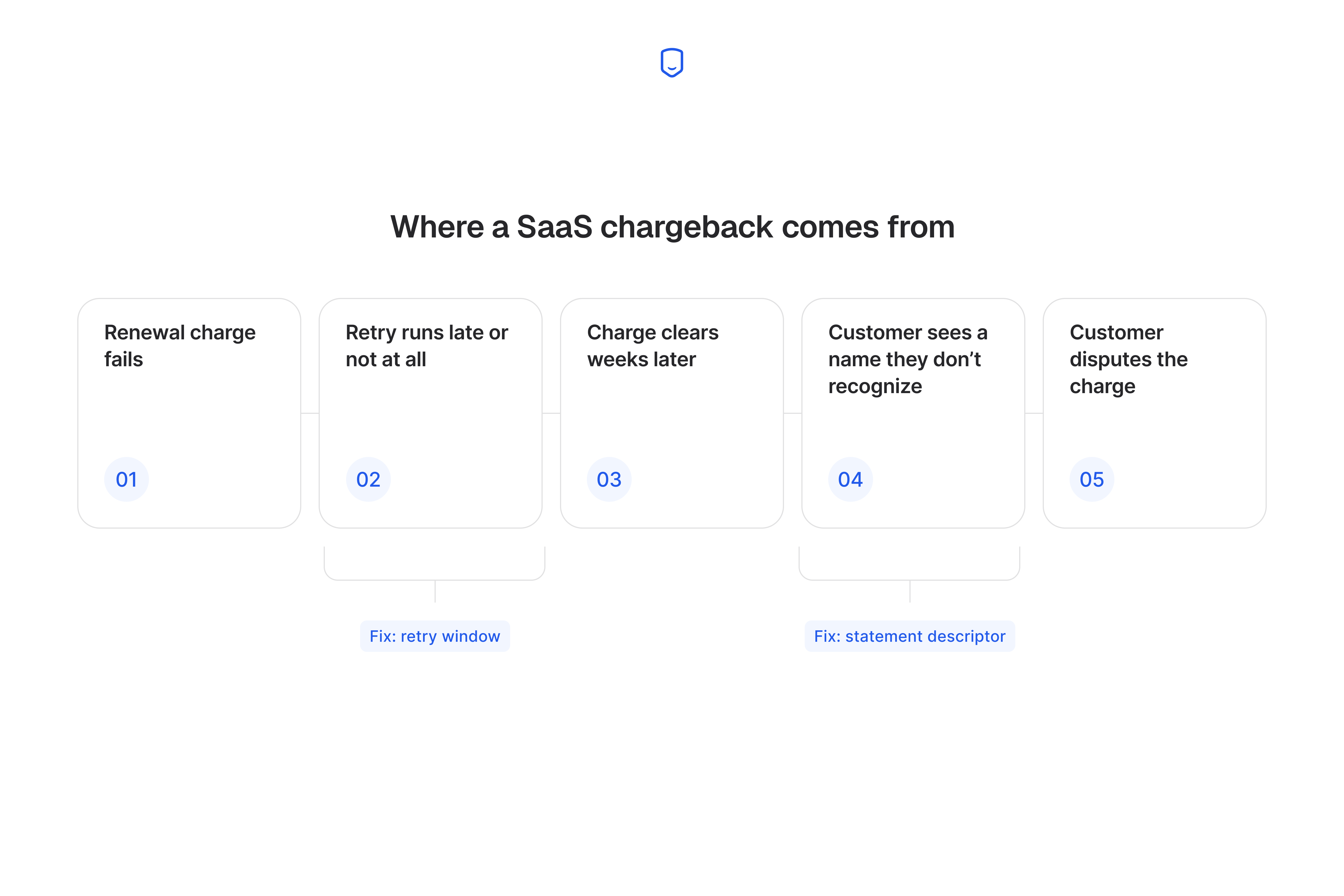
To avoid chargebacks in SaaS billing, start with the failed subscription payment behind most of them. A card expires or a bank declines the renewal, the merchant retries wrong or not at all, and weeks later the customer disputes a charge they don't recognize. Fix the retry logic in your billing platform and add the usual fraud checks, and most of these stop before a bank sees them.
I've spent a lot of time in support tickets on this. A merchant's "chargeback problem" usually turns out to be one dunning setting nobody touched since setup. Get those settings right and you can cut avoidable disputes inside one billing cycle.
Our guide to chargeback prevention covers the wider picture.
Key takeaways
How do you avoid chargebacks in a subscription business?
Most SaaS and subscription chargebacks trace back to failed recurring payments. Fraud accounts for the smaller share. Work through your billing platform's dunning and retry settings first, then AVS, CVV, and 3D Secure checks, then dispute alerts through Ethoca and Verifi.
That order works because of what the customer actually complains about. A renewal fails, nothing retries it cleanly, and the customer keeps using your product without paying. When an attempt finally works, weeks late, the charge lands on a date nobody expected.
You control all three of the things that go wrong there. The retry timing, the name on the statement, and the amount are all yours to set.
A fraud filter reads the card at the moment of payment and asks whether it looks stolen. That's a different question from whether the customer recognizes the charge.
That charge passes every fraud check you own and still comes back as a dispute.
Stolen-card fraud and first-party misuse do need checkout controls instead, because the person disputing never held the card.
Fix dunning and retry settings before anything else
Your dunning and retry settings are where most recurring-billing disputes start, so fix them first. Fraud tools add friction at checkout. Dispute alerts cost you money per alert. Both cost less when you have fewer chargebacks, and fixing your retries is what cuts the number.
Each step changes the traffic the next one is tuned against. That is why the order holds. Three things to work through:
- Your own platform's retry logic. How it handles a failed charge.
- A second platform's approach. How Recurly handles the same failure differently.
- Your current settings. What to change this week.
1. How Chargebee handles failed payments and retries
Chargebee runs two kinds of retry, and reads the decline reason to decide whether to retry. Synchronous retries happen "within milliseconds of the original attempt." Asynchronous retries wait, which the docs put at "days/weeks" after the failure.
Reading the decline reason first is what saves you money. A card declined for low funds might go through on Friday. A card reported stolen never will, and each retry adds another failure to the record. Chargebee's docs say it "assesses whether to initiate a retry based on the decline reason."
The asynchronous schedule is yours to set, though. Chargebee lets you "configure retries to occur daily, every few days, or at custom intervals." You also set "how many retry attempts should be made."
Chargebee publishes no default day count for those attempts, so today's schedule is whatever someone picked during setup. Check two numbers there:
- The days between the failed renewal and the last retry. That span is how old the charge looks when it finally goes through.
- Whether a dunning email goes out with the retries. A long window with no email means the customer gets charged with no warning.
Summary: Chargebee retries based on the decline reason, but the asynchronous schedule is a setting you have to choose.
2. How Recurly handles failed payments and retries
Recurly's standard setup is five retries, every two days, and Intelligent Retries swaps that for adaptive timing. Both numbers are published in its docs.
Intelligent Retries drops the fixed schedule. Recurly calls it a "machine learning-powered retry engine" in its docs. It reads "payment gateway decline codes and payment metadata," then adds "patterns learned from 2,000+ merchants to determine the optimal retry window."
So it picks a moment "whether that's hours, days, or weeks later," and the count moves with it, "typically between three and 15."
That range is the difference between the two modes:
| Setting | Standard retries | Intelligent Retries |
|---|---|---|
| Retry attempts | 5 maximum | 3 to 15, typically |
| Timing | Every 2 days | Hours, days, or weeks, chosen per charge |
| What decides timing | A fixed schedule | Decline codes and metadata across 2,000+ merchants |
A longer window can cost you more than it recovers, because the attempt that clears on the 15th try reaches a customer who stopped expecting it.
So watch the recovery rate and the dispute rate together. Recovery rate counts a retry as a win even when the customer disputes it later. Each month, compare disputes on retry-recovered accounts against accounts that paid first time.
If your disputes cluster around recovered payments, keep the five. Then send an email on the first failure and another when the charge goes through.
3. What to check in your own dunning settings this week
Your retry window, dunning emails, descriptor, and payment-update flow cause most dunning problems I saw in support. All four are settings you can check in an afternoon:
- Your retry window. Note the day of the last attempt, and shorten the window if a charge clears two weeks after the renewal date.
- Your dunning email schedule. Confirm an email goes out on the first failure, because a customer who hears nothing learns from their statement.
- Your statement descriptor. Run a test charge on your own card and read the descriptor exactly as it appears on the statement.
- Your payment-update flow. Try updating a card yourself, from the dunning email, on a phone, and count the screens.
Descriptors came up in over 600 support conversations I handled in one year, more than any other topic. Our guide to the billing statement descriptor covers what to put in it.
Every extra screen between the email and a saved card is a customer who gives up and disputes later.
A retry recovers the card, and a customer who already decided to leave still wants out. A subscription somebody meant to cancel three months ago comes back as a dispute anyway.
Add fraud and checkout controls for stolen-card disputes
AVS, CVV, and 3D Secure address a card used by someone who never held it. That is a different origin from your dunning settings. Each check works differently:
- AVS compares the billing address the customer types against the address the card issuer holds.
- CVV confirms the customer holds the physical card, or at least its three-digit code.
- 3D Secure asks the issuer to authenticate the cardholder, usually with a push notification or a code.
3D Secure changes who pays for the fraud.
When the cardholder authenticates through it, card-not-present liability shifts to the issuer. A later "I didn't authorize this" dispute becomes the bank's problem, which covers stolen cards. Our explainer on 3D Secure walks through the authentication step.
Turning it on for every customer costs you sales. Each prompt gives someone another reason to leave checkout. Set your gateway's rule to fire on charges above your average order value, on new cards, and on mismatched AVS results.
Digital wallets make the other two checks less reliable. The wallet swaps the card number for a token, so AVS and CVV read that token instead of the real card details.
Digital wallets reached 40% of US e-commerce transactions in 2025. Any customer paying that way gives both checks less to read.
Some customers recognize the charge perfectly well and dispute it anyway. We cover that in our friendly fraud prevention guide.
Summary: Fraud checks stop unauthorized-use disputes, so risk-score 3D Secure to protect your checkouts.
What is a chargeback, and how is a SaaS one different?
A chargeback is a forced refund the cardholder's bank pulls from your account, and the SaaS version disputes one renewal in an agreed series. Both kinds arrive with a reason code and a deadline.
What changes is what the customer objects to, and what you have to prove:
| One-time purchase | Subscription charge | |
|---|---|---|
| What the customer objects to | The purchase itself | One renewal in a series |
| Which charge it is | The first and only one | Often the third or twelfth |
| Evidence that answers it | Proof you delivered | Access logs and renewal terms |
Trial conversions and plan changes move the charge to a date the customer isn't expecting, which a single purchase never does.
The trial-to-paid step is the sharpest version of that. A customer forgets the date the trial converts, then reads the first real charge as something they never agreed to.
The money is different as well. You issue a refund yourself, with no chargeback fee and no mark against the monitoring programs. A chargeback comes out of your account through the bank, and it counts against you.
So a customer who emails about a charge they don't recognize is offering to settle for the refund alone.
Why chargebacks put a SaaS merchant account at risk
Go over Visa's dispute-ratio threshold and your acquirer can fine you or drop your account. Visa runs this through VAMP, its Acquirer Monitoring Program. Mastercard runs its own excessive-chargeback program.
VAMP counts fraud and disputes together against your settled transactions. Visa's formula adds TC40 fraud records to TC15 dispute records. It then divides by settled TC05 transactions.
A dunning-driven dispute and a stolen-card dispute count exactly the same.
For the AP, Canada, EU, and US regions, the numbers to measure yourself against are these:
| Program | Merchant threshold | Status |
|---|---|---|
| VAMP | 220 basis points (2.2%) | current |
| VAMP | 150 basis points (1.5%) | from 1 April 2026 |
| VDMP and VFMP | 0.65% to 1.8% | retired June 2025 |
According to Visa's own VAMP fact sheet, work out your current ratio against the 1.5% threshold rather than the current 2.2%. A merchant sitting at 1.8% today is under the current threshold and over the one replacing it. That gap is your window to fix the retry settings.
To find your own number, open your processor's dispute dashboard. Read the dispute count and the settled count for one month, then divide. Our guide to the chargeback rate explains the version they show you.
Dunning disputes jump after a migration or a price increase. A ratio built on a good quarter goes over the threshold the month a renewal batch fails.
Common causes of chargebacks in a subscription business
Fraud, cancellation confusion, and billing errors drive most SaaS chargebacks, and each needs a different fix. The category a dispute belongs to tells you which of your systems to open:
- Fraudulent transactions. Fixed with checkout controls.
- Subscription and cancellation confusion. Fixed with clearer flows and notifications.
- Billing errors. Fixed with accurate invoicing and payment-update flows.
Each one gets its own fix below.
1. Fraudulent transactions
Fraudulent transactions are the category where the person disputing never agreed to the charge. Someone uses a stolen card on your checkout, or tests card details against your signup form. The real cardholder disputes it when the charge shows up.
SaaS free trials attract this specifically. A trial is a cheap way to find out whether a stolen card still works. A card tester wants a small authorization on a checkout that skips address and CVV checks.
Fix this at signup rather than in your billing settings:
- Turn on address and CVV checks on the signup form.
- Run a small pre-trial authorization hold on the card, a dollar or less, and reject the signup if it fails.
- Flag any account creating three or more trials from one IP or card BIN within 24 hours.
Keep this category in proportion, though. It's the one merchants over-invest in, because it feels like a crime.
2. Subscription and cancellation confusion
Cancellation confusion is a dispute from a customer who thinks they already cancelled. They clicked something that felt like cancelling, or deleted the app and assumed that ended it. The next renewal then looks unauthorized.
These disputes come from customers who already decided to stop paying. That makes them a retention problem as much as a payments one. Churn.io covers the retention side in their guide to how chargebacks drive involuntary churn.
Three changes cut this category:
- Send a renewal notice 7 and 30 days before an annual plan charges.
- Send a cancellation confirmation email naming the last day of access.
- Put the cancel link in account settings, two clicks from a dashboard.
A customer who cancels cleanly might come back, while one who had to fight your flow never returns.
Annual plans need the earliest notice of all. Twelve months is long enough that the renewal reads as a brand-new charge. It's also the largest amount you'll ever bill that customer, and a big forgotten charge is the one they take to their bank.
Go cancel your own subscription and count the screens.
3. Billing errors and unclear invoicing
Billing errors are disputes where your system charged right by its own logic and wrong by the customer's. Three shapes cover most of them:
- A retry that ran twice charges the card twice.
- An upgrade leaves an old plan price in place.
- A prorated invoice arrives with nothing explained.
Each one is defensible on your side and unrecognizable on a statement.
Unclear invoicing is what turns a support ticket into a dispute. When a customer can't tell what a charge was for, calling the bank beats emailing you. So itemize what changed on any invoice that isn't the standard amount, and send it first.
Mid-cycle plan changes produce the amount nobody expects. An upgrade on day 14 creates a prorated line, a credit, and a new base rate. The total that hits the card matches none of those three numbers.
Name the change in the invoice's first line, in plain words, before the arithmetic.
Refund a duplicate charge the day you spot it, without waiting for the customer to ask.
Summary: Match the dispute to its category first, because checkout fixes do nothing for cancellation confusion.
Setting up dispute alerts as your last line of defense
Dispute alerts from Ethoca and Verifi catch what your other settings miss, before a chargeback files. Ethoca is Mastercard's network. Verifi is Visa's, running both RDR and CDRN.
An alert reaches you during the pre-dispute window, before the bank files. Set an auto-refund rule below a dollar threshold and the case ends as a refund. It never counts against your ratio.
Dropship.io is a SaaS product-research platform on Stripe. It enabled RDR and CDRN in June 2024. Dropship.io's case study data shows its dispute rate fell from 0.93% to 0.16% the next quarter, well clear of Stripe's reserve holds.
Treat that as one customer over one quarter.
Set the auto-refund threshold at your average subscription charge. A typical renewal then refunds itself, and anything larger goes to a person. A low threshold leaves most alerts unhandled.
Sellers billing in several currencies need a rule for each one. A USD-only default declines a euro alert silently.
Three limits to know before you buy:
- Wallet charges through Apple Pay and Google Pay are harder to match.
- Some issuers skip the networks and file directly.
- An alert you don't action within 24 hours becomes a chargeback anyway.
Our Ethoca alerts guide covers the Mastercard side.
The Verifi explainer covers Visa.
We can get you alerts from every network on one account, once your other settings are doing their share. Start with Chargeback.io alerts.
How to respond when a SaaS chargeback still happens
Respond inside your processor's deadline, with evidence written to the reason code on the notice. Five steps, in order:
- Act inside the response window: Your processor sets it, often 7 to 21 days, and a missed deadline is an automatic loss.
- Gather your evidence: Pull the signup record, the accepted terms, the invoice, the usage logs, and any support conversation.
- Confirm the reason code: Read the code on the notice before you write anything.
- Write to the code: A cancelled-recurring code needs your policy and usage proof, while a fraud code needs authentication records.
- Submit through your processor: Upload the packet, keep a copy, and log the outcome.
Sending everything you have to the wrong code loses disputes you could have won. Our guide to chargeback reason codes explains what each one asks for.
Our reason code lookup tool covers every network in one place.
Log which of your own systems produced each dispute. A run of cancelled-recurring codes in one month means your cancel flow is the problem.
Every dispute you fight costs staff time plus the fee you already paid. You lose some of them anyway, which is why the retry settings matter more than the rebuttal.
FAQ
Can a customer dispute a charge they forgot to cancel?
Yes, and banks often side with them. Your defense rests on documented cancellation steps and usage records from after the disputed date.
Does switching billing platforms change my chargeback risk?
Yes, mostly in the migration window. Retry schedules, dunning emails, and descriptors rarely carry over exactly, and a changed descriptor confuses customers.
Do I need alerts if dunning and fraud settings already work?
It depends on your volume and how close you sit to your processor's threshold. Alerts cost money each, so they earn their place when leftover disputes still risk your ratio.
What happens to my VAMP status if I switch processors?
Your ratio follows the acquirer, so a switch resets the count but keeps your history. Acquirers review dispute performance at onboarding, and a merchant leaving a monitoring program arrives with conditions.
